 Demon VS Robot DVSR Marketing Website
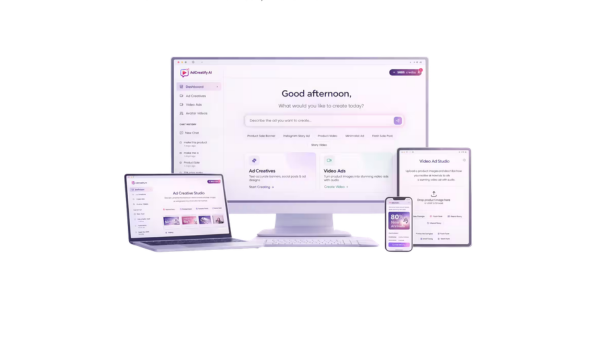
Every marketer who runs sponsored advertising in 2025 will feel the same pressure: make more creatives, test them faster, and limit expenses from going over budget. Because of that strain, AI ad generation solutions are becoming more and more popular with eCommerce, agency, and performance marketing teams.
Adcreatify AI is an AI-powered ad creation engine that makes video and image commercials for Facebook, TikTok, Instagram, YouTube, and other sites using product URLs or descriptions. It is based on more than ten years of experience with software, tools, and technology, and it solves one of the most resource-intensive parts of paid advertising: making unique content.
This guide is for eCommerce sellers, performance marketers, agencies, small business owners, and content creators who want to know exactly what Adcreatify AI performs. You'll get a list of its features, a direct comparison to traditional methods, examples of how it's used in the real world, information about pricing, advantages and downsides, and a step-by-step guide on how to set it up. Users say that ad testing cycles are up to 4 times faster and the cost per acquisition is 2 to 3 times lower than with manual production workflows. But first, let's look at the whole picture.
Before we get into further detail, let's start with a brief, simple answer to the question, “What is Adcreatify AI?”
What Is Adcreatify AI? (Quick Answer)

Adcreatify AI is a platform for making ads that uses AI to make video and graphic ads from a product URL or a textual description. You don't need a voiceover artist, a video editor, or a motion graphics designer to get started. The system can write scripts, put together visuals, add AI voiceover, and format for different platforms, all in less than 60 seconds every batch.
The platform makes ads for Facebook feeds, Instagram Reels, TikTok Shop demonstrations, YouTube Shorts, Snapchat, and Pinterest, which are all big advertising channels. Each format is changed to fit the native standards of that channel, such as aspect ratios, caption lengths, hook placement, and safe zones.
Adcreatify AI takes care of the following tasks for you:
- Scriptwriting and ad copy generation from product information,
- AI voiceovers and avatar-based video delivery,
- Hook and CTA variations across multiple ad formats,
- Aspect ratio and duration optimization per platform,
- Batch creation of A/B testing variants
It's important to note that Adcreatify AI is not a video editor that can be used for any purpose, like Adobe Premiere or DaVinci Resolve. It's not a tool for managing ad accounts either; you still buy media, bid, and build up campaigns in your ad platform. It's like the creative production engine that runs your ad account. You can get 10 different video ads in only a few minutes by pasting a link to a TikTok Shop product. Now let's see how each feature works in real life.
Core Features and Capabilities of Adcreatify AI
Adcreatify AI's usefulness comes from five key areas of capability. Each one focuses on a distinct production problem that marketing and creative teams deal with all the time. Knowing them all helps you figure out where the platform works and where it doesn't.
Multi-Platform Optimization (TikTok, Facebook, Instagram, YouTube & More)
Ad creativity doesn't go well from one platform to another. A Facebook feed video needs a different frame than a TikTok Shop demo or a YouTube Shorts video. Adcreatify AI uses native-format templates to build this knowledge into every output.
The platform enables ad generation for:
- TikTok: Shop product demonstrations, UGC-style hooks, vertical 9:16 format,
- Facebook and Instagram: Feed advertising, Reels, Stories, carousel-style picture sequences.
- YouTube features shorts, pre-roll bumpers, skippable in-stream formats,
- Snapchat versus Pinterest: Platform ratios and creative traditions
Every template has rules for safe zones, default durations, and where to put captions. The system takes care of resizing and reformatting for you, so you don't have to.
AI Avatars, UGC Style, and Personalization
In direct-response campaigns, advertising with user-generated content (UGC) style always do better than polished brand videos. The reason is trust: when a genuine person speaks to the camera, it doesn't feel like an ad. Adcreatify AI does this by using a collection of over 100 AI avatars that have facial expressions, lifelike gestures, and lip-sync audio.
The following UGC-style themes are available:
- “Customer talking about the product” format,
- Unboxing walkthrough,
- Reaction and testimonial video styles
The platform changes the message dependent on the type of audience, in addition to the visual layer. Scripts that focus on awareness are given to cold audiences. Retargeting viewers get viewpoints that make them feel like they need to act right away and that other people have done the same thing. People who look like you get messages that make them want to do better. This creative-level segmentation is what makes Adcreatify AI more than just a video generator.
Automated A/B Testing Variants
You have to test paid ads to find out what works. The trouble with making innovative things by hand is that it takes days to make enough different versions to test adequately. Adcreatify AI makes a lot of different ads at once by adjusting the parts that are most likely to effect performance.
Some things that can change across your batch are:
- Opening hooks (question, statement, bold claim),
- Call-to-action phrasing and placement,
- Offer framing (discount vs. scarcity vs. benefit-first),
- Background music and audio tone,
- On-screen text overlays and captions
You may test 10 different ads in one day instead of making 3 ads by hand every week. That speed up shortens the time it takes to learn after launch.
Product-Focused Intelligence (NER, Benefit Extraction, Angles)
The quality of an AI system's output depends on how effectively it understands what it gets. Adcreatify AI reads a product page and uses named entity recognition (NER) and benefit extraction to figure out what is most important to a buyer.
In simple terms, the system tells the difference between features (what the product has) and benefits (what the buyer gets). It finds unique selling points and, if there are reviews, it finds social proof signals. It builds ad angles on top of that:
- Pain-point relief angle: “Tired of X? Here's how this fixes it.”,
- Aspiration angle: “Imagine achieving Y with Z.”,
- Comparison angle: “Unlike other products, this does W.”
This is why the quality of the input on your product page has a direct effect on the quality of the output in your adverts. A product site with clear benefits, consumer language, and review excerpts will help you write better ad scripts than a listing with few details.
Analytics-Driven Iteration (If Available)
The production side of making ads is only half of the process. The other half is knowing which creatives work and sending that information back into the next phase of production. Adcreatify AI can keep track of how well creative works when platform integrations are turned on.
It's vital to note that your ad platform, such as Meta Ads Manager, TikTok Ads Manager, or Google Ads, is still the major source of ad performance statistics. The analytics layer of Adcreatify AI adds to that data instead of replacing it.
Pricing Plans and OTOs detailed
Front-End – Starter Plan ($27 one-time or $27/mo)
- Entry-level access with 200 AI credits for content creation
- Supports AI image generation and short video ads
- Compatible with all major platform sizes for publishing
- Includes commercial license for monetization
- Best for beginners testing AI content creation tools
OTO 1 – Creator Plan ($47/month)
- Includes more AI credits and faster content generation
- Higher-quality outputs with priority rendering
- Access to advanced styles and enhanced creative options
- Ideal for creators who need better performance and output quality
OTO 2 – Pro Plan ($97/month)
- Unlocks even more credits with ultra-fast generation speed
- Includes premium templates and analytics dashboard
- Comes with priority support for smoother workflow
- Best for serious marketers and high-volume users
OTO 3 – Agency Plan ($197/month)
- Maximum credits with full client and team management features
- Includes commercial rights and white-glove support
- Designed for agencies handling multiple clients and projects
- Enables scalable AI service business setup
OTO 4 – Whitelabel / Done-For-You ($599/month)
- Launch your own branded AI platform with full customization
- Create sub-accounts, sell plans, and use your own domain
- Includes 1-on-1 setup support and full DFY system
- Pay only for generation usage while keeping full control
- Best for users building a SaaS-style AI business
Adcreatify AI vs. Traditional Ad Creation (and Other AI Tools)
It helps to examine the numbers side by side before you choose a tool. The comparison below looks at three situations: utilizing Adcreatify AI, doing it by hand with a creative team, and using a generic AI video technology that wasn't made for advertising.
Side-by-Side Comparison: Time, Cost, and Scale
Aspect | Adcreatify AI | Manual / Traditional | Generic AI Video Tools |
Time to create 10 ads | Under 5 minutes | 10–20 hours | 30–60 minutes |
Cost per 10 ads | Low (subscription or credits) | High (designer + editor fees) | Medium (higher per-video cost) |
Variants generated | 10+ in one batch | 1–2 | 3–5 |
Platform optimization | Native templates per channel | Custom edits per platform | Partial |
Languages / voices | 20+ | Outsourced translation/VO | Limited |
Expertise required | Beginner-friendly | High creative and video skill | Medium (prompt skill needed) |
The stats make it apparent how fast and how much. Adcreatify AI lets an agency that used to make two short advertisements a day make 20 or more and test them the same day. The pricing comparison is also very clear: making 10 polished ads as a freelancer can cost anywhere from a few hundred to a few thousand dollars. A gadget that you pay for every month changes the equation a lot.
That being said, the comparison only works when the amount of creativity is important. When storytelling depth is the most important thing for brand campaigns, the math changes. This gets us to the following point.
When Manual Editing Still Makes Sense
The Adcreatify AI workflow doesn't work with every ad campaign. In some situations, a human editor and a production staff work best together.
- High-budget brand films where cinematic quality and detailed post-production are part of the brief,
Complex motion graphics that require custom animation or 3D design, - Niche storytelling with very specific casting, location, or visual direction,
- Luxury product categories where aspirational production value is the selling point itself
For most teams, a hybrid process is the best way to go. Adcreatify AI can help you run a lot of first-round creative testing. Find the best hooks, angles, and calls to action. Then put the production resources back into making a better version of only the best performers. This method lowers the chance of spending a lot of money on creative work that hasn't been backed up by statistics.
How Adcreatify AI Compares to Other AI Ad Makers
The market for AI video tools has developed a lot, but most of the tools in that field are geared for making general content, such explainer films, social media clips, and presentations. From the ground up, Adcreatify AI is made with performance marketing in mind.
The main things that set them apart are:
- URL-only input: You don't need to write briefs or prompts, a product link is enough to start,
- A/B testing variant generation: Most general AI video tools produce one output, Adcreatify AI produces a testing batch,
- Ad-platform native templates: Each format is built around the specs and conventions of actual ad placements, not generic video frames,
- Avatar variety and UGC replication: Over 100 avatars with lip-sync, purpose-built for direct-response ad formats,
- Multi-language support: 20+ languages with native-sounding voiceovers, without external translation or recording
For someone who works in performance marketing or eCommerce with paid traffic, these differences are real practical benefits, not just nice-to-haves.
Real-World Use Cases and Results with Adcreatify AI
It helps to understand aspects in the abstract. It is more helpful to see them used in real business situations. Here are four situations that show how Adcreatify AI can help you get real results.
eCommerce and TikTok Shop Sellers
A seller with more than 50 SKUs on TikTok Shop has a unique problem: each product has its own creative, and TikTok users become tired of creative quickly. Adcreatify AI fixes this by making a lot of product demo films for each SKU, each with hooks that work best on the platform and different calls to action.
- Sellers using this workflow report ROAS improvements in the 3–5x range once testing cycles are running continuously,
- Creative fatigue (the drop in ad performance as audiences become overexposed to the same creative) reduces when new variants are introduced weekly,
- The workflow: import product URL → select TikTok Shop template → generate 10 variants → push top performers to ad account
Facebook and Instagram Retargeting Campaigns
People who see your ads again respond differently than people who see them for the first time. You need to send a different message to someone who has never heard of the brand than to someone who has been to a product page but didn't buy. Adcreatify AI makes different ads for each stage of retargeting.
- Cart abandonment reminders that use language that makes people feel like they need to act quickly,
- Social proof versions that include ratings and review excerpts,
- Framing a time-limited offer for people who are very close to making a decision
According to reports, teams that use urgency-based retargeting creatives made through the platform saw a 40% increase in click-through rates (CTR) compared to generic static picture advertisements aimed at the same audience.
Performance Marketing Agencies and Freelancers
When an agency has 10 or more clients at the same time, creative creation is generally the thing that keeps them from taking on more clients. Adcreatify AI helps people on the account team who aren't designers execute first-round creative tests without having to wait in line for a design.
- Production time reduction: agencies report up to 90% less time spent on initial creative rounds,
- Strategists and media buyers spend more time on audience research and bid strategy,
- Each client account gets a dedicated testing batch each week, something that was previously possible only for top-tier budgets
Localized and Multilingual Campaigns
When you want to sell a product in a Spanish-speaking, Portuguese-speaking, or any other non-English-speaking area, you usually need to translate it, record a voiceover, and make it more appealing to that market. Adcreatify AI does all three at once.
- Select target language and regional voice from the platform's library,
- The script is translated and the voiceover is generated with native-sounding delivery,
- Consistent brand messaging is preserved across all language versions,
- Time-to-launch for a localized campaign drops from weeks to hours
Is Adcreatify AI Worth It? Pros, Cons, and Best-Fit Users
There are times when a tool works really well and times when it doesn't. This is an honest look at both sides.
Key Advantages (Pros)
Adcreatify AI eliminates the production hurdles that stifle creative testing in paid advertising. Here's where it provides obvious value:
- Time savings: The platform can do in minutes what a creative team takes days to do. This is the main and most consistent benefit.
- No requirement for video editing skills: Any business owner or marketer can make video that is good enough for ads without any technical experience.
- Native platform templates: Each output is prepared to the specs of the channel it will be sent to, which lowers rejection rates and boosts ad performance from the start.
- 20+ languages with lip-sync avatars: Brands of all sizes may now run multilingual campaigns.
- With batch A/B testing, you start every campaign with more than 10 tested options instead of just one or two.
- Lower cost per creative: The subscription model has a lower average cost per ad unit than using freelancers to make ads.
- Addresses creative fatigue: New versions can be made all the time, so campaigns don't become stuck.
- Speed to learn: Making creative work faster implies collecting data faster, which means making optimization decisions faster.
- Content volume for new accounts: This platform fills the gap right away for ad accounts that don't have any creative inventory.
Limitations and Possible Downsides (Cons)
No technology can cover every use case, so understanding where Adcreatify AI falls short is just as crucial as knowing where it shines.
- Visual quality ceiling: AI-generated images, especially avatar-based videos, might not be as good as those made in a studio. This disparity is clear in areas where looks are really important, such fashion, luxury items, and fine dining.
- Optimization learning curve: It takes practice to figure out how to use performance data from ad platforms to create better prompts and template choices. The tool makes output, but it still takes human judgment to read performance and change inputs.
- Adcreatify AI takes care of the creative side of things, but it's not a whole ad platform. Your ad platform still has campaign setup, audience targeting, bid management, and funnel architecture.
- Generic output risk: If you use the same template logic for all of your campaigns without changing the angles, scripts, or audience signals, the creatives may seem like they were made with a formula. Here, guidance is important.
- Review and compliance check needed: The platform does not promise that ads will follow the rules. Before launch, every creative needs to be looked over by a person.
Who Should (and Shouldn't) Use Adcreatify AI?
Some business profiles are well-suited to the platform, while others do not. Here is a breakdown based on real usage trends.
Ideal users:
- eCommerce firms that pay for traffic on Facebook, Instagram, or TikTok and need a steady stream of new creatives,
- Performance marketers that need to quickly test offers and have a lot of different options to select the best one,
- Agencies that handle a lot of small to medium-sized accounts where the speed of production significantly affects the number of clients they can handle,
- Freelancers and solo operators who require professional-quality ads but don't have access to design tools,
- Companies that wish to reach new language markets and make their products more relevant without hiring voice actors and translators
Less-ideal users:
- Luxury brands that rely on custom, high-quality content for their visual identity, where AI-generated pictures might hurt their brand image,
- Teams that follow rigid brand rules that don't allow for much creative freedom or AI-generated interpretation,
- B2B SaaS firms who use long-form demo content or live product walkthroughs instead of short-form creativity in their ads,
- Companies where the purchase process is extensive and based on relationships, therefore high-volume creative testing isn't as important to the strategy.
If you are in the first group, you should really think about using the platform. If you fall into the second group, a hybrid approach, where you only use the technology for certain sorts of campaigns, can be a better fit than fully adopting it.
Getting Started with Adcreatify AI: Setup and First Ad
You don't need to know how to code or have a production crew to set up your first campaign in Adcreatify AI. Here are the four steps, along with useful tips for each one.
Step 1: Create Your Account and Activate the Free Trial
Visit the Adcreatify AI website and sign up with your email address. The onboarding procedure is quick and easy. You just need to verify your account, set up a short profile, and get access to the dashboard. You may usually get a free trial without having to give your credit card information up front. Before you sign up for a membership tier, use the trial to run your first batch of creatives.
Step 2: Prepare Your Product Page or Offer
The quality of the output is dependent on the quality of the input. Before creating advertising, ensure that your product site or landing page contains the following elements:
- Clear product photos or visual assets
- Benefit-focused descriptions (not just feature lists)
- Customer reviews or testimonials, if available
- Pricing, offers, and any urgency signals (limited stock, sale deadline)
A great product site provides the AI with more precise data from which to extract benefits, angles, and script languages. A sparse or imprecise page will yield generic results.
Step 3: Generate Your First Batch of Ads
Enter your product URL in the platform's input field. Next, choose your target platform (TikTok, Facebook, Instagram, etc.), a creative style (UGC avatar, lifestyle, product demo), and your language and voice. Create at least 5 to 10 variations for the first batch. This provides enough variants to do a real A/B test from the start, rather than optimizing prematurely around one or two creatives.
Step 4: Review, Edit, and Export
Before downloading or pushing any creative to your ad account, run through a brief quality check:
- Does the script match your brand tone and factual claims?,
- Is the logo or brand name placed correctly?,
- Are the CTAs accurate for the offer you're running?,
- Does the ad comply with the policies of the destination platform?
You can change any script lines, swap out CTAs, or change overlay text in the platform's changing layer. Then export in the format that the site you want to use needs. Most files are ready to be uploaded to Google Ads, Meta Ads Manager, or TikTok Ads Manager right away.
Common Questions About Adcreatify AI (FAQs)
Is Adcreatify AI beginner-friendly?
Yes, the platform is made for those who don't have experience making videos or designing things. You don't need any technical skills to paste a URL and choose a template. Most new users make their first batch of ads within 15 minutes of signing up. You can find tutorial resources in the dashboard that explain both the fundamental workflow and more complex uses like audience-segmented scripting.
Does Adcreatify AI work for non-eCommerce businesses (B2B, local, info-products)?
It works in various situations that aren't e-commerce, but the results vary based on the sort of firm. Plumbers, dentists, and gyms that offer services in the area can utilize the platform to run short video advertising on Facebook or Instagram, especially for special deals. People who make info products can utilize it for marketing that raise awareness at the top of the funnel. The platform won't be as important to B2B organizations with longer sales cycles because short-form video advertising are usually a lesser portion of the B2B funnel, but they're not completely absent from it either.
Can I use my own footage, images, or voiceovers?
Yes. Adcreatify AI lets you upload your own visual assets, such as product photos, existing video clips, and brand footage, and blend them with AI-generated features. You can also contribute your own voiceover instead of utilizing an AI-generated one. This makes it feasible to create creatives that combine original brand assets with AI-generated scripting, editing, and formatting.
How many ad variations should I test per campaign?
It depends on how much money you have and how big your campaign is, but a good place to start is with 5 to 10 variations each campaign. If you test less than five, you won't have much data to work with. If you test more than 20 at once, your budget may be spread too thin across too many factors, making it harder to produce statistically significant results on any one creative. Start with 5 to 10 different options, find the top 2 to 3, and then use those winners to make the following round of options.
Will Adcreatify AI replace my designers or editors?
For routine ad creative production, short-form video advertisements, platform-specific image creatives, and A/B test variants, the platform takes over a major chunk of what designers and editors formerly did. However, technology does not replace human judgment in areas such as brand strategy, storytelling depth, creative direction, and quality assessment. Most teams experience a job shift rather than a personnel drop, with designers focusing on brand-level work and campaign strategy rather than monotonous ad production activities.
Can Adcreatify AI guarantee better ROAS or lower CPA?
In paid advertising, no platform can promise exact results, and Adcreatify AI is no different. It gives you more and better-structured creatives to try, which makes it more likely that you'll find a winning combination faster. Over time, better testing coverage leads to faster improvement, which leads to higher ROAS. The platform makes it easier to get better results, but the real results will depend on your targeting, offer, landing page, and how your ad account is set up.
Is Adcreatify AI compliant with ad policies on Facebook and TikTok?
The platform makes creatives that follow standard advertising rules, but the advertiser is still responsible for making sure they follow the rules. Facebook, TikTok, and other sites check advertising at the account level, and how they interpret their rules can be different. Check the ad policies for the platform you're using before you start any creative work, especially for regulated categories like health claims, financial items, or content that is only for certain ages. You can use template selections and script guidance to help Adcreatify AI avoid typical policy triggers, but it is not a tool for making sure policies are followed.
How is Adcreatify AI different from generic AI video generators?
Generic AI video generators are made to make all kinds of films, like marketing videos, presentations, explainers, and social media clips. They don't take into account the structure and purpose of direct-response advertising. Adcreatify AI is different because it focuses on performance marketing. For example, it uses URL-based input instead of open-ended prompts, generates A/B testing variants as a core output, builds ad-platform native templates around real placement specs, and uses UGC-style avatar formats to match organic-looking content. It also offers multi-language voiceovers to make campaigns more relevant to different audiences. If your main purpose is to make money from ads rather than make videos in general, that difference is really important.
[/tie_list] [/box]- SPECIAL BONUS 1 – MultiNetwork Poster

- SPECIAL BONUS 2 – ContentLynk

- SPECIAL BONUS 3 – AK Booster Pro

- SPECIAL BONUS 4 – FB MultiPoster

- SPECIAL BONUS 5 – GramHood

- SPECIAL BONUS 6 – Serp Scribe

- SPECIAL BONUS 7 – RankMe

- SPECIAL BONUS 8 – RankMe


















