 Demon VS Robot DVSR Marketing Website
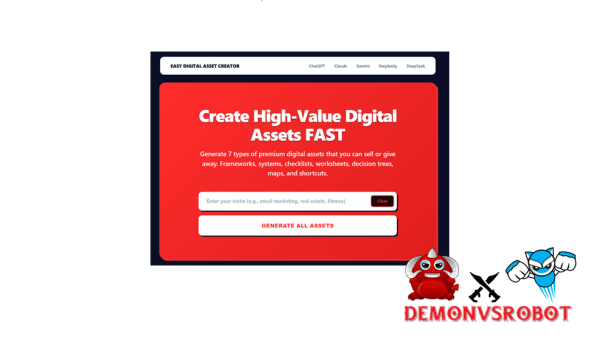
 You presumably want a direct response, not a sales pitch, if you've been looking for Easy Digital Asset Creator. This guide tells you just that.
Easy Digital Asset Creator is a cheap, prompt-based system that takes one concept and turns it into seven AI prompts for seven different digital assets. It uses tools like ChatGPT, Claude, or Gemini to do this. It doesn't make content by itself. Instead, it gives you the organized starting points that most designers spend hours attempting to figure out on their own.
This is a hands-on review based on tests that were done over and over again in several areas, such as business, health, and productivity. This guide talks about:
- What Easy Digital Asset Creator actually is, and what problem it solves
- How the step-by-step workflow functions in practice
- Which asset types it produces, with real-world use cases
- How it compares to tools like Jasper, Canva, and manual content creation
- An honest breakdown of strengths and limitations
- FAQs covering licensing, AI compatibility, and non-English use
The first step is understanding exactly what Easy Digital Asset Creator is and what problem it's designed to solve.
What Is Easy Digital Asset Creator?

Easy Digital Asset Creator is a method that takes one concept or phrase and turns it into seven AI prompts that are specific to different types of digital products.
It's like a kit to get ready. Before you start cooking, you get all your tools, materials, and recipe ready. Easy Digital Asset Creator provides that for digital material. It solves the “blank page” problem by offering you a structured framework to work from instead of expecting you to come up with one.
Just to be clear, this is not an AI model. You still need some outside tool, such ChatGPT (the free version works), Claude, or Gemini, to make the actual output. The Easy Digital Asset Creator gives you the exact prompts you need for each asset, which helps you get there faster and with better organization than a general “write me a checklist” command.
It works in almost any field, including fitness, parenting, B2B marketing, personal finance, coaching, and e-commerce. That property of being able to work in any niche is one of the reasons that content creators and solopreneurs can use it again and again after the first purchase.
Category | Details |
Asset Type | AI prompt system for digital asset creation |
Deliverables | 7 asset-specific prompts per idea |
Compatibility | ChatGPT (free/paid), Claude, Gemini, and similar AI tools |
Ideal Users | Creators, coaches, consultants, marketers, small businesses |
To decide whether this tool fits your workflow, you need to see who it was actually designed for, and where it tends to fall short.
Key Features and Deliverables: What You Actually Get
The method gives one organized prompt for each of the seven different sorts of digital assets. The tool's practical depth becomes obvious when you know what each type performs and when to utilize it.
- A framework is a concept or method that shows you how to do anything step by step. It is the main part of a course module or workshop presentation. For example, the “5-Stage Launch Framework for New Coaches” gives students a clear path to follow instead of merely random advice.
- A checklist is a list of tasks with checkboxes next to them. It turns information into action, and its power comes from being accountable. An agency might use Easy Digital Asset Creator to make a whole onboarding checklist for all of its clients in one go, and then change it to fit each industry.
- A worksheet has fields and questions that the reader must fill out. Setting goals, worksheets, and self-assessment templates are some of the most common tools used in coaching and personal development. They work just as well as free lead magnets or premium downloads.
- A decision tree shows branching reasoning, or “if this, then that,” to help the reader choose the proper option. A fitness coach could use a decision tree to help potential clients choose the correct program before making a sales call.
- A mind map is a hierarchical thought map that shows the whole topic landscape at once. It's especially helpful for designing a content strategy or as a visual guide for a course.
- A cheat sheet is a short, rapid reference summary, such the one page that students keep open while they work. “SEO Quick Wins Cheat Sheet” and “Cold Email Formula Sheet” are two examples of content that may be given out or used as course supplements.
- A swipe file is a set of copy patterns, structures, and samples that you can use again and again. This is where you can find email follow-up sequences, social media caption templates, and sales page formulas.
Asset Type | Definition | Example Use Case | Time Saved |
Framework | Step, by, step model or process | 5, Stage Launch Framework | 1, 2 hours |
Checklist | Tick, box task or criteria list | Client onboarding checklist | ~1 hour |
Worksheet | Guided questions or fields | Goal, setting worksheet | 60, 90 minutes |
Decision Tree | Branching options and logic | Programme selection guide | 1, 2 hours |
Mind Map | Hierarchical idea map | Content strategy map | ~1 hour |
Cheat Sheet | Quick, reference summary | SEO quick wins sheet | 30, 60 minutes |
Swipe File | Copy patterns and templates | Email follow, up sequence | 1, 2 hours |
Each asset type has its own specialized prompt structure, which is the primary difference between this system and a normal “write me a checklist” command entered directly into ChatGPT. When you compare Easy Digital Asset Creator to other available solutions, the significance of this differential becomes evident.
Pricing Plans and OTOs detailed
Front-End: Easy Digital Asset Creator FE
- AI-powered system for creating digital assets such as prompts, templates, and online content products.
- Simple dashboard for generating ready-to-sell digital products without technical skills.
- Built-in tools for packaging digital assets for marketplaces or personal websites.
- Beginner-friendly workflow designed for creators entering the digital product space.
- Commercial-use capability allowing users to sell or distribute generated assets.
OTO 1: Easy Digital Asset Creator Custom GPT
- Custom GPT builder designed to create specialized AI tools for digital asset generation.
- Ability to train GPT models with prompts, templates, and niche-specific instructions.
- Create personalized AI assistants for generating digital products automatically.
- Tools for packaging and selling custom GPT solutions as digital products.
- Scalable system for building multiple niche AI tools for business use.
OTO 2: Easy Prompt Creator Pro
- Advanced prompt generator designed for creating high-quality AI prompts.
- Prompt templates optimized for different niches and AI applications.
- Tools for organizing and managing prompt libraries efficiently.
- Ability to create and sell prompt packs as digital products.
- Automation features that speed up prompt creation for multiple projects.
OTO 3: Side Hu$tler
- Training and tools focused on building online side income with digital assets.
- Step-by-step strategies for monetizing digital products and prompts.
- Business frameworks designed for freelancers and digital creators.
- Resource library with tools for launching small online income streams.
- Practical methods for turning digital assets into recurring income opportunities.
OTO 4: Max Organic Traffic
- Organic traffic training focused on attracting visitors without paid ads.
- SEO strategies for promoting digital assets on search platforms.
- Social media traffic methods for expanding audience reach.
- Content marketing systems designed to increase long-term visibility.
- Traffic generation blueprint for promoting digital products consistently.
OTO 5: Niche Brainstormer
- AI-powered niche research tool for discovering profitable digital product ideas.
- Idea generator for creating digital assets across multiple niches.
- Market analysis tools that help identify trending opportunities.
- Brainstorming system designed to spark new product concepts quickly.
- Strategy framework for selecting niches with strong monetization potential.
Who Is Easy Digital Asset Creator Designed For in 2026?
Easy Digital Asset Creator is for folks who make structured content on a regular basis but don't want to spend hours figuring out how to frame it each time.
The main people who will use this are solopreneurs, coaches, and course makers who need to put together instructional materials quickly. A life coach, for example, doesn't want to start from scratch when they make a goal-setting worksheet for a new client. They need a structure with clear fields and questions to answer, which Easy Digital Asset Creator delivers them in minutes with a focused prompt instead of hours of writing on their own.
Freelance marketers or copywriters that need frameworks and swipe files as deliverables also need the same thing. Agencies who make onboarding checklists for a lot of clients will also find the system quite beneficial. This is because the unlimited use structure implies that repeating the process across accounts doesn't cost anything more.
Small enterprises that make lead magnets or low-cost digital offers fit the target profile perfectly. This technique is perfect for making a “7-day meal plan checklist” or a “content calendar decision tree” for a landing page opt-in.
That being said, it's not for everyone. This is not the tool for you if you want a fully automated solution where you push a button and get a polished, branded PDF. You need to feed your information into an AI model and do some basic modification on the back end to get the outcome. In the same way, if you don't use AI tools at all, the workflow won't operate.
People who aren't tech-savvy can use the system. You don't need to know how to code, design, or do complex prompt engineering to utilize it well.
If you fit one of these profiles, here's how Easy Digital object Creator works, from the idea stage to the finished object.
How Easy Digital Asset Creator Works: Step, by, Step Workflow
The workflow has four steps. It's easy to move from one stage to the next, and the whole process, from idea to useful content, takes about 5 to 15 minutes, including AI development and light editing.
- Step 1: Write down your idea. You begin with one word or phrase that describes a topic. It may be something like “keto diet plan for beginners,” “Instagram growth for yoga teachers,” or “client onboarding process for freelancers.” The system is made to function with both narrow and broad inputs, so your idea doesn't have to be too detailed.
- Step 2: Get seven personalized prompts. The system makes one prompt for each of the seven asset categories from that one input: a framework, a checklist, a worksheet, a decision tree, a mind map, a cheat sheet, and a swipe file. The prompts are set up differently for each sort of object, which is what makes them different from just telling ChatGPT to “make something.”
- Step 3: Put it into your AI tool. Put the prompt you picked into ChatGPT, Claude, or Gemini. You can also change the variables, target audience, tone, and length before you run. You check what the AI makes.
- Step 4: Export and style. Put the output into Google Docs, Notion, or Canva. Make it look like your brand, then save it as a PDF to use as a lead magnet, post it as a course module, or give it to a client directly.
You can do this with as many ideas as you like, which leads us to the topic of what each form of asset actually delivers you.
How It Compares to Other Tools and Manual Creation
Easy Digital Asset Creator has a unique place in the world of content development. It is not a full funnel builder, an AI engine, or a design platform. Knowing where it fits and where it doesn't can help you figure out how to add it to an existing workflow.
Easy Digital Asset Creator is faster than making things by hand. It usually takes 60 to 90 minutes to make an organized worksheet from scratch. With the correct prompt, you can change the same structure in less than five minutes. For most active content producers, the one-time expense of getting over the blank page problem is worth it because of the mental effort it takes.
The difference is that these are specialized AI writing tools, unlike Jasper or Writesonic, which are more broad. Those tools are made for long-form writing, such blog posts, ad scripts, and email campaigns. They can technically make a checklist, but it won't be as detailed as one made with a dedicated, asset-specific prompt. It's like asking a general contractor to create a custom bookcase instead of employing a carpenter who does that all the time.
The difference is the other way around when you compare Canva templates. Canva takes care of the layout and design of visuals, but it doesn't create frameworks or content structure. Easy Digital Asset Creator takes care of the structure and content, but it doesn't make anything look good. Both tools are necessary for a full workflow.
Solution | Pricing Model | Core Strength | Comparison Point |
Easy Digital Asset Creator | One, time purchase | Asset structures and targeted prompts | Requires external AI and design tools |
General AI Writer | Monthly subscription | Long, form copy and blog content | Less specialised for asset frameworks |
Canva Templates | Monthly or Free tier | Visual design and layout | No content framework generation |
Manual Creation | Time cost only | Fully custom, brand, specific assets | Slow, high blank, page friction |
The one-time pricing model is worth mentioning. Most comparable products, including those with a restricted utility, demand continuous subscriptions. For creators working in numerous genres or projects, the compounding value of unrestricted access without monthly costs is a tangible benefit.
With the comparison landscape established, the inevitable next inquiry is: what does actual use disclose about the true strengths and limitations?
Strengths and Limitations, Honest Pros and Cons
Key Advantages of Using Easy Digital Asset Creator
The advantages here are tied to concrete production outcomes, not theoretical benefits.
- Low one, time expense compared to output value. For creators who make more than one digital product a month, the cost per asset goes down to almost nothing after the first few uses. In comparison, a single membership to Jasper or Writesonic costs a lot more every month.
- Time savings on the structure of assets. The hardest aspect of making a digital asset is figuring out how to organize it, not writing it. Easy Digital Asset Creator makes that structural choice in one step, giving you more time to edit and customize instead.
- Gets rid of blank page friction. The approach gives you a clear beginning point right away, so you don't have to ask yourself, “Where do I even start?” If you are a coach or consultant who writes content between client sessions, that change in how you work will add up over time.
- Works in any specialty. One purchase works just as well for a fitness instructor, an e-commerce consultant, a parenting weblog, or a B2B firm. Because it is narrow and agnostic, the tool doesn't limit what you can do.
- Easy to use copy and paste workflow for beginners. You don't need any abilities in rapid engineering. The system is for those who know what they want to do but don't know how to get it out of an AI tool in the best way.
- Can be used by producers with a lot of volume. An agency or prolific creator can use this to batch, plan content calendars, or product suites. For example, they might make an entire digital product bundle for a client in one day. The limitless use structure is helpful for them. You can think of as many concepts as you like.
- Makes the quality of AI prompts better in all of your tools. Even if you use ChatGPT every day, working with purpose, constructed, asset, and specialized prompts will help you generate stronger prompts over time. That talent can be used in other programs besides Easy Digital Asset Creator.
Limitations, Trade, Offs, and When It Might Not Be Enough
Every tool has a ceiling. Understanding where Easy Digital Asset Creator's ceiling is located minimizes disappointment and guides how you arrange your workflow around it.
- It requires an external AI tool to function. ChatGPT, Claude, or Gemini must be open and operational. If you don't already have an account on at least one of these platforms, you'll need to set it up separately.
- Does not create final, designed PDFs. The output is structured text material, not a fully prepared, brand-ready document. Moving that text into a visual format, whether through Canva, Adobe Express, or the hands of a professional designer, is a separate step.
- Output quality is determined by your subject area knowledge. The prompts give structure, while you provide precision. In highly technical or regulated industries, like as finance, law, and medicine, AI output must still be thoroughly reviewed by a competent expert before release.
- Templated prompts can generate fundamentally comparable assets. If two distinct authors use the same prompt system without considerable customization, they may wind up with assets that have a similar structure. Light editing and niche-specific terminology are required to differentiate the product.
- There is no built-in funnel integration or analytics. The solution does not have a means for connecting your assets to a landing page builder, email sequence platform, or performance tracking tool. These integrations take place completely outside of the system.
To be more exact, Easy Digital Asset Creator is a content and structure accelerator. It is not a business-in-a-box solution, and it does not present itself as such. If you require a brand, hefty e, book with bespoke illustrations and a customized layout, you will need Canva or a designer once the material has been prepared. If you're producing for a highly regulated industry, the structure output should be a starting point rather than a final compliance-ready document.
With the strengths and weaknesses in full view, the remaining questions are usually particular, the type that do not fit neatly into a review section but are important before making a decision.
Frequently Asked Questions About Easy Digital Asset Creator
- Is Easy Digital Asset Creator beginner, friendly if I've never used AI before?
Yes. The way the workflow works is by copying and pasting. You get a pre-made prompt, open a free AI program like ChatGPT, paste it in, and get your output. You don't need to know anything about prompt engineering or AI configuration before. You can utilize this technique from day one if you can open a browser tab and paste text.
- Do I need a paid ChatGPT subscription, or will the free version work?
The prompts work with the free version of ChatGPT (GPT, 3.5 or GPT, 4o mini). You don't have to pay for GPT, 4, or GPT, 4o to get more precise and nuanced results, especially for complicated assets like decision trees or multi-step frameworks. Most people find it useful to start out for free and then pay to upgrade.
- Can I use it for non, English content or bilingual assets?
Yes, but you need to make a small change. Add a language instruction before running the prompt, like “Write this all in Vietnamese” or “Make a bilingual version in English and Vietnamese.” Most major languages work well with AI tools like ChatGPT and Claude. The structure of the prompt is still good; only the output language changes.
- Is there a limit to how many ideas or assets I can generate?
No. Easy Digital Asset Creator works on a one-time purchase approach, so you can use it as much as you want. You can run the system with as many ideas as you like, whether you're making one lead magnet or constructing a whole suite of digital products for many clients.
- Can I resell the assets I create with it as paid products or in client projects?
You own the stuff you make, and the assets you make are your own. That being said, the conditions of use for the AI tool you use (such ChatGPT, Claude, etc.) also apply to what you make, especially if you plan to sell it. Check the current terms of service for the AI platform you are utilizing, as these rules change over time. Most big AI providers allow content made for client projects or sold as digital goods, but it's always a good idea to check first.
- How is this different from just asking ChatGPT directly to “create a checklist”?
This is the most crucial difference to know. When you tell ChatGPT to “make a checklist,” it gives you a general result: a flat list that doesn't have any internal logic, hierarchy, or audience-specific framing. Easy Digital Asset Creator gives you a built-in prompt that tells you what kind of asset you need, what structure it needs to have, who the audience is, and what other factors are important. The difference in quality of the outcome is like the difference between telling a contractor to “build something” and giving them a technical blueprint.
- Does it work for technical or regulated niches like finance, health, or legal?
It works to build the structural underpinning of assets in various sectors, but experts need to look over the result before it can be shared. The prompt system can help you make a checklist for “managing Type 2 diabetes with diet,” but a certified dietitian or doctor should evaluate the specific claims and suggestions before the checklist is shared with others. The system gives you the frame, and you, or a qualified reviewer, fills it in appropriately.
- What happens if AI tools change or update in the future, will the prompts still work?
Most of the time, prompt systems last longer than single AI features since they rely on instruction and following logic, which is a basic skill of all main language models. Small changes to ChatGPT, Claude, or Gemini may affect how the output looks, but the structural prompts will still work. That being said, big changes to the model can need quick fixes, which is a known problem for any system that relies on third-party AI infrastructure.
All of the answers above go back to the same main point: Easy Digital Asset Creator gets rid of blank page syndrome for structured digital assets. It doesn't take the place of your design tools, your editing skills, or your knowledge. It gets rid of the most common problem that slows down the creation of digital products: the time and mental effort it takes to figure out how to put what you already know into a format that works.
[/tie_list] [/box]- SPECIAL BONUS 1 – MultiNetwork Poster

- SPECIAL BONUS 2 – ContentLynk

- SPECIAL BONUS 3 – AK Booster Pro

- SPECIAL BONUS 4 – FB MultiPoster

- SPECIAL BONUS 5 – GramHood

- SPECIAL BONUS 6 – Serp Scribe

- SPECIAL BONUS 7 – RankMe

- SPECIAL BONUS 8 – RankMe


















