 Demon VS Robot DVSR Marketing Website
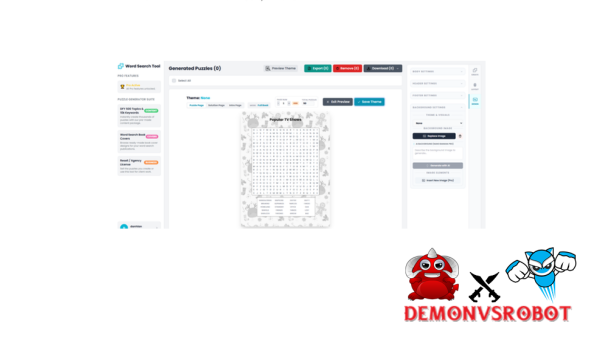
Puzzle books are popular on Amazon KDP, in schools, and in households all throughout the world. Some word search books are in the top 10,000 on Amazon, which means they sell hundreds of copies per month. That kind of traction is impossible to ignore, whether you're a teacher making vocabulary resources or a self-publisher making a library of passive income.
A word search puzzle book generator is software, either web-based, desktop-based, or AI-assisted, that takes lists of words and makes full puzzle book interiors out of them. It does everything in one workflow, from making grids to solution pages to layout to export.
These tools are mostly used by two groups. The first group is teachers, tutors, and homeschooling parents who require personalized learning materials quickly. The second group includes people that want to make money, such Amazon KDP sellers, print-on-demand publishers, and digital product developers who want to grow and build their puzzle book portfolios.
This guide has the main definitions, a hands-on look at several sorts of tools, a full 1-hour KDP workflow, specialty methods, and answers to the most common questions. Based on more than ten years of experience with software, tools, and technology, the focus here is on what really works, not theory.
- Definitions and core concepts
- A comparison of generator types (free and paid)
- A step-by-step KDP publishing workflow
- Profitable niche and monetization strategies
- FAQs and practical troubleshooting
As of 2026, all of the tools, specs, and market information in this book are still valid.
What Is a WordSearch Puzzle Book Generator?

A wordsearch puzzle book generator makes it easy to turn big groups of themed words into full puzzle books that you can print, share, or sell.
A wordsearch puzzle book generator is a piece of software that takes word lists as input, makes word search grids on its own, makes matching solution pages, and puts everything together into a book interior that can be printed or read on a computer. It takes away the need to build grids by hand, arrange letters cell by cell, or undertake layout work in tools like Microsoft Word or Adobe InDesign.
It is helpful to separate these two ideas that are connected yet different. One puzzle generator makes one grid at a time, which is great for worksheets in the classroom. On the other hand, a puzzle book generator can handle a lot of puzzles at once, keep the pages consistent, and provide a full inside file that is ready to print or upload.
Most tools take three types of input: a list of words arranged by theme, a level of difficulty, and a grid size that you want to reach. It then analyzes the placement logic, randomizes the letter fills, applies the font settings, and puts the output together. Most of the time, the last export is a PDF, PNG, or SVG file that is already set up for KDP trim sizes.
Most book generators have the following standard features:
- Adjustable grid sizes, from 9×9 up to 25×25 cells
- Word placement directions: forward, backward, diagonal, and vertical
- Randomized or controlled letter fill for empty cells
- Page numbering, puzzle titles, and instruction text
- Optional decorative elements or themed visual headers
The main difference between a puzzle generator and a puzzle book generator is the size and format of the result. One makes a worksheet, and the other makes a product.
How Does a WordSearch Puzzle Book Generator Work (Step-by-Step)?
Knowing how the system works makes it easier to pick the proper tool and fix things when they go wrong. No matter what brand or interface your generator has, the procedures following will work for it.
Step 1: Enter your lists of words. You can upload or paste groupings of words that go together. Most systems let you sort these into groups, like 50 lists of 10 words each for a book with 50 puzzles. Some platforms also let you import CSV files or spreadsheets for big quantities.
Step 2: Configure your puzzle rules. You can customize the grid size, acceptable word directions, and difficulty level. Larger grids with diagonal and backward placements result in more difficult problems. Smaller grids with forward-only placement are appropriate for younger readers. You can also choose fonts, heading styles, and any explanatory text.
Step 3: Make the grids. The algorithm puts each word into the grid and checks for conflicts, which are letters that don't match. Then, random letters are put in the empty cells. Well-made generators use randomization seeds to make sure that no two puzzles in the same book appear the same. This is a vital feature for the reader's experience.
Step 4: Make pages with solutions. The tool makes a copy of each grid with the concealed words highlighted or circled. These are either right after each puzzle or in a separate answer key section at the back.
Step 5: Page layout and pagination. The pages with the answers to the puzzles are in order. There is a uniform use of titles, page numbers, and spacing. The output of book generators is an organized document, not a loose collection of images. This is the main difference between book generators and single-puzzle tools.
Step 6: Download and export. You can export the finished interior as a PDF (the most usual format for KDP), a PNG, or an SVG. Many tools come with preset bleed and margin settings for common KDP trim sizes like 6×9 inches (about 15×23 cm) and 8.5×11 inches (about 22×28 cm).
For example, you may build a list of 10 animals with words like ELEPHANT, GIRAFFE, PENGUIN, and CROCODILE. Put it into a generator that is configured to a 15×15 grid and lets you arrange things diagonally. You get a filled grid puzzle and a solution page that goes with it in just a few seconds. You can make a 100-page book inside in less than five minutes by multiplying that by 50 thematic listings.
Different tools have different advanced settings. Some puzzles come in shapes other than rectangles, like circles, stars, and hearts. Some people like mixed-format books that have both crosswords and word searches or sudoku grids. In the higher tiers, you can use batch processing, which lets you work on hundreds of puzzles at once.
Who Uses a Word Search Puzzle Book Generator (And Why)?
More people than most people think use these tools. The one thing that everyone has in common is that they desire output, either for learners or for customers, without having to spend hours doing manual layout work.
Teachers, Tutors, and Homeschooling Parents
The main purpose of this club is to help people remember words. Word searches help kids learn how to spell, retain words that are specific to a subject, and stay interested without the stress of a test format.
With generators, teachers may make personalized puzzles that fit with certain classes, such “Solar System,” “Shakespeare vocabulary,” and “Spanish food words,” in minutes instead of hours. You may make a new grid layout every year with the same word list, so the materials keep up to date without any further work. Common outputs are homework sheets, printed school handouts, and seasonal activity bundles.
Parents, Event Organizers, and Hobbyists
This group employs generators to make things fun and unique. A puzzle book that has a child's name, their favorite characters, or inside jokes from a family reunion in it becomes something special instead of just a book.
Book generators are especially helpful here because they can make 20 to 50 pages of related content, which is adequate for a party favor, a birthday present, or a trip activity pack. For example, it takes an afternoon to make a bridal shower word search book without a generator, but it just takes 30 minutes with one.
KDP Sellers and Low-Content Book Publishers
Word search book generators are great for self-publishers who want to make big catalogs on Amazon KDP, IngramSpark, or Etsy. The idea is to publish several books each month in certain areas, such as “word searches for seniors,” “ESL vocabulary practice,” and “holiday activity books for kids.”
Generators make this possible by automatically creating a lot of puzzles, adding KDP-spec margins and bleed, and making sure that the visual style is the same throughout several titles. A seller who wants to upload 10 to 50 books a month can't afford to build each interior by hand. The generator takes the place of a large part of that production time.
Corporate Trainers, Therapists, and Niche Professionals
This is a little but real part. Word search puzzles are low-stress mental activities that occupational therapists and cognitive training specialists utilize, especially with older people or people who are recovering from an injury. The puzzles should be easy to read, have clear instructions, and be on something people already know about.
Corporate trainers utilize lists of terms that are distinctive to their companies to make onboarding exercises or materials that help people get to know the brand. If the tools let you update after the layout is done, you can add a brand logo or custom header. The generator makes the content engine, and the professional provides the context.
Key Benefits of Using a Word Search Puzzle Book Generator
What does it matter what tool you use or whether you even use one? When you think about how much time and effort it takes to make something by hand, the answer becomes evident.
Key Benefits of Using a Puzzle Generator
- Significant Time Savings: Creating 100 puzzles by hand in Word or Excel takes 10 to 20 hours; a generator does the same in 30 to 60 minutes. This efficiency is the primary reason for high-volume publishing.
- Scalability Across Multiple Books: A single publisher can create dozens of interiors per month without hiring a designer. The tool does the repetitive task, and the human offers the niche instruction.
- Consistent, Professional Results: Each puzzle uses the same font, spacing, and grid style. Manual production frequently produces variations that indicate low quality to readers and algorithms.
- Reduced Error Rate: Generators avoid frequent manual errors such as missing words, duplicate grids, and misaligned solution pages during manufacturing.
- Automatic Solution Pages: Answer keys are generated alongside each puzzle, eliminating the tremendous workload of manually creating 100+ keys.
- Grid sizes and word orientations can be tailored to certain audiences, such as 10×10 forward-only grids for youngsters or 20×20 complicated grids for adults.
- Commercial-Use Licensing: Most premium generators give specific commercial rights for KDP and print-on-demand, ensuring legal certainty for output meant for sale.
- KDP-Ready Export Settings: Presets for trim sizes (6×9 in, 8.5×11 in), bleed, and margins eliminate a common cause of Amazon upload rejection.
- Multi-Channel Output Flexibility: Support for different formats (PDF for KDP, PNG for presentations, and SVG for Etsy) enables diverse product distribution.
- Low-Cost Niche Testing: Publishers can create and publish a sample interior in less an hour to test new audience concepts with little work or money invested.
- Language and Character Support: The inclusion of accented characters and non-English alphabets makes these tools useful for ESL educators and multilingual markets.
- Branding and Style Control: Custom fonts and layout styles enable puzzles to reflect a school's visual identity or a publisher's series branding.
- Reusability of Word Lists: The same curated word list can yield a unique grid arrangement each time it is processed, making it perfect for recurrent educational programs.
- Offline-Ready Classroom Materials: A single prepared inside file can be printed in batches for classroom usage without requiring continuous internet access.
Manual Creation vs. Using a Generator
Aspect | Manual Creation | Using a Generator |
Time per 100 puzzles | 10–20+ hours | 30–60 minutes |
Error risk | High (missing words) | Low (automated checks) |
Styling consistency | Variable | Uniform across all pages |
KDP compliance | Requires manual spec matching | Built-in trim/margin presets |
Scalability | 1–3 books per month | 10–50+ books per month |
To give you an idea of how royalty math works, a 6×9 paperback book on Amazon KDP that costs $7.99 USD and sells for $2.50–$3.50 after printing costs makes about $2.50–$3.50 each sale. If you sell 100 copies of 10 different books each month, you could make $2,500 to $3,500 in royalties on interiors that a generator made in one day of work.
Pricing Plans
Basic Plan ($79)
- 100 pages per generation
- Standard AI word generator
- Basic fonts only
- 5 backgrounds included
Pro Plan ($89 – One-Time)
- Unlimited puzzle generation
- Advanced system prompts
- 10 premium fonts
- 10 premium backgrounds
- Insert custom images/backgrounds
- Auto intro builder
- Auto table of contents
- AI background generator
- 5 premium cover templates
Enterprise (Contact Us)
- Unlimited puzzle generation
- Advanced system prompts
- User-customized fonts
- User-customized backgrounds
- Insert custom images/backgrounds
- Auto intro builder
- Auto table of contents
- Unlimited AI background generator
- 5 premium cover templates
- Source code & local hosting included
Types of Word Search Puzzle Book Generators (And How to Choose)
Not all generators are made for the same job. The market has moved toward Agentic AI and cloud-based orchestration by 2026. Know the four primary types of tools before you choose one.
The easiest way to get started is with free online single-puzzle generators. Puzzlemaker and Canva's basic templates are examples of tools that make one puzzle at a time, usually as a worksheet that can be printed. They are useful for teachers who need special puzzles from time to time, but they aren't meant for making books.
For 2026, Integrated AI Workspaces (SaaS) will be the best of the best. Skywork AI and KDPEasy are two examples of platforms that break the job down into two parts: AI-driven content research and automated grid generation. These programs can make 50 to 200 or more puzzles at once, style them the same way every time, and generate KDP-ready PDFs with just one click.
Design-first settings include template-based systems like Canva AI and Add-ons. In 2026, you can use text-to-design prompts in Canva's Magic Studio to make themed word search layouts. They are good for publishers that want to focus on visual branding and “aesthetic” interiors for Etsy or small bookshops.
Power users can still buy Desktop Batch Software once. These applications provide you the most freedom over grid algorithms, bespoke shapes, and random “seeds.” The downside is that they are harder to understand than newer cloud apps.
Tool Type | 2026 Examples | Best For | Typical Output |
Free / Basic | Puzzlemaker | Teachers, hobbyists | Single worksheets |
AI Workspaces | Skywork AI, KDPEasy | Professional Publishers | Full 100+ page books |
Design-First | Canva AI | Etsy sellers, branded books | Highly stylized interiors |
Desktop / Pro | Puzzle Wiz Pro | Power users, high-volume batching | Vector-perfect grids |
Best Niches and Audiences for Profitable Word Search Books (2026)
A profitable niche has four things: a clear audience, ongoing interest, room for a series, and demand that isn't already being met by competitors.
Evergreen Educational and AI-Assisted Niches
Sight words will always be necessary for young learners. But in 2026, publishers are doing well with themes like “Coding for Kids,” “Renewable Energy Terms,” and “AI Literacy for Beginners.” These categories will always be in demand since parents need them every school year.
The “Nostalgia” Niche for Seniors
This is still the most profitable part of Amazon KDP. The essential things to focus on are extra-large type (18pt+ font), easy-to-follow grid directions, and topics that have to do with nostalgia, 1960s pop culture, historic radio episodes, and old-fashioned Americana. You may make a 40-puzzle book in minutes by using an AI program to make word lists about “Life in the 1970s.”
Wellness and “Low-Stress” Hobbies
As “digital detox” trends grow, word searches about mental health, positive affirmations, and gardening therapy are some of the most popular. These books are generally sold as “anxiety-relief” aids, and to maintain the experience stress-free, the designs are usually soft and the words are just placed forward.
Supplemental Q&A: Answers to Common Questions About Word Search Puzzle Book Generators
Can I legally sell books made with most word search puzzle generators?
Yes, most of the time. Most paid generators, like Book Bolt or Skywork AI, let you utilize their software for business purposes. Before publishing, always read the license carefully. You must check the Terms of Service before uploading to KDP because some free programs don't allow commercial use.
Do I need graphic design skills to publish a word search book on KDP?
No. The generator takes care of the inside of the puzzle. Tools like Canva offer KDP-compatible templates for the cover that don't require any creative skills. Anyone can access the whole production pipeline without any formal design training.
Can free generators be used to create commercially sold books?
It depends on the instrument. Some free generators specifically allow commercial use, whereas others don't. Look at the licensing documents on the tool's website. If the terms are unclear, contact the developer directly and request a formal response before publishing.
Is it possible to create bilingual word search books with a generator?
Yes, however support varies. Some generators can handle accented characters and non-Latin alphabets well, while others cannot. Testing with a small batch before committing to a full book interior is the most realistic option. Tools that use UTF-8 character encoding can properly handle multilingual input.
Can I make money with just one word search book?
Technically, sure, but a single book rarely earns much revenue on its own. The economics of KDP low-content publishing favor larger catalogs. In a well-chosen niche, a single title can generate $20 to $50 per month. A catalog of 30 to 50 titles in related niches combines to form something more significant.
What are the main types of word search puzzle book generators?
The five main types are free online puzzle makers that only make one puzzle, paid SaaS tools that focus on books, desktop software that you buy once, template-based platforms like Canva that have puzzle add-ons, and spreadsheet/script-based DIY tools. Each one is good for a different amount of output and budget.
Which tools are best for teachers vs. KDP publishers?
Free single-puzzle tools that work well with Canva for planning are great for teachers who only need to do 10 to 20 puzzles a week. KDP authors who put out 10 to 50 books a month need to pay for a bulk generator that can export PDFs that are ready for KDP. The set of features that are important to each group is very different.
What puzzle elements can be customized?
The grid size (usually 9×9 to 25×25), how words are placed (forward, backward, vertical, diagonal), the font type and size, the puzzle titles and headers, the instructions, the letter fill method, the page numbering style, and in some tools, the grid shape (circle, heart, star). On more advanced platforms, you can also add your own decorative borders or visual features with a theme.
What are the typical age groups for word search books?
There are normal market segments for kids ages 4 to 6, kids ages 6 to 9, kids ages 10 to 12, teens ages 12 to 17, adults, and seniors. Each group has different needs for grid sizes, font sizes, and content themes. Large-print versions, which are a unique niche on Amazon KDP, are especially helpful for seniors.
Which platforms can I use to sell word search books and printables?
The main sites are Amazon KDP (for print-on-demand eBooks and paperbacks), IngramSpark (for wider distribution to stores and libraries), and Etsy (for digital PDF downloads and physical books). Teachers Pay Teachers is a great place for teachers to sell material that is ready for the classroom. You can sell digital goods directly to customers with Gumroad and Payhip.
How do free word search generators compare to paid ones for KDP use?
There are free tools that can do single problems well, but they don't have the bulk generation, pagination control, or KDP-spec export that book publishers need. Paid tools make the whole process of interior creation automatic. When you want to publish on KDP on a large scale, free tools slow you down because you have to do by hand what a paid tool could do in seconds.
What is the difference between a puzzle generator and a puzzle book generator?
A puzzle generator only makes one problem at a time, with one grid and one page of answers. A puzzle book generator can work on anywhere from 50 to more than 200 problems at once, makes sure that the style is the same on every page, numbers the pages, and sends out a single file that is ready to print. The book maker is used to make things, and the single-puzzle generator is used to make worksheets
Should I use a desktop app or an online SaaS puzzle generator?
Desktop apps provide you more control over algorithms and don't need an online connection. SaaS products that are available online tend to get new features more often, work with cloud storage, and have more up-to-date interfaces. An online SaaS tool is the best choice for most KDP publishers in 2026, unless you have specific needs that can't be met online.
Is Canva alone enough, or do I need a dedicated puzzle generator?
Canva is a tool for making layouts and designs, however it doesn't make puzzle grids. You can make gorgeous covers and format finished pages with Canva, but you still need a puzzle generator to make the actual word search. The generator makes the puzzle's inside, while Canva takes care of the cover and any custom page layout.
How do word search books compare to other low-content books in terms of effort and reward?
Word search books are not too hard or too easy. Blank diaries and lined notebooks don't need much material, yet there is a lot of competition for them. Sudoku and crossword books need more complicated logic to make them. Word search books are a good choice because they are easy to make and there is a strong, active market for them across all age groups and subjects. Choosing a niche is the most important factor. A well-chosen topic with a specific audience does better than a generic title, no matter what format it is in.
[/tie_list] [/box]- SPECIAL BONUS 1 – MultiNetwork Poster

- SPECIAL BONUS 2 – ContentLynk

- SPECIAL BONUS 3 – AK Booster Pro

- SPECIAL BONUS 4 – FB MultiPoster

- SPECIAL BONUS 5 – GramHood

- SPECIAL BONUS 6 – Serp Scribe

- SPECIAL BONUS 7 – RankMe

- SPECIAL BONUS 8 – RankMe


















